 Copytrade Wallet Analysis
Wallet tab
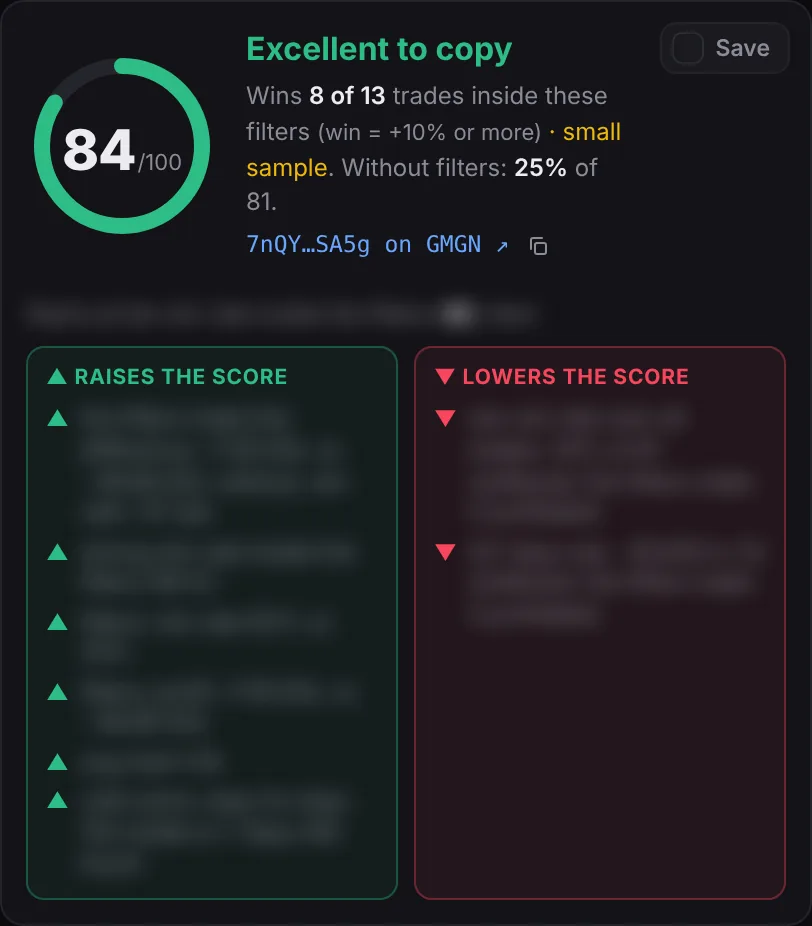
Paste a Solana wallet and press Score. The extension pulls the wallet's trades from the last 31 days, analyzes up to its newest 100 tokens (you can change the number) and shows:
- The 0–100 score, its grade (Excellent, Good, Coin flip, Avoid copying) and every line that went into it.
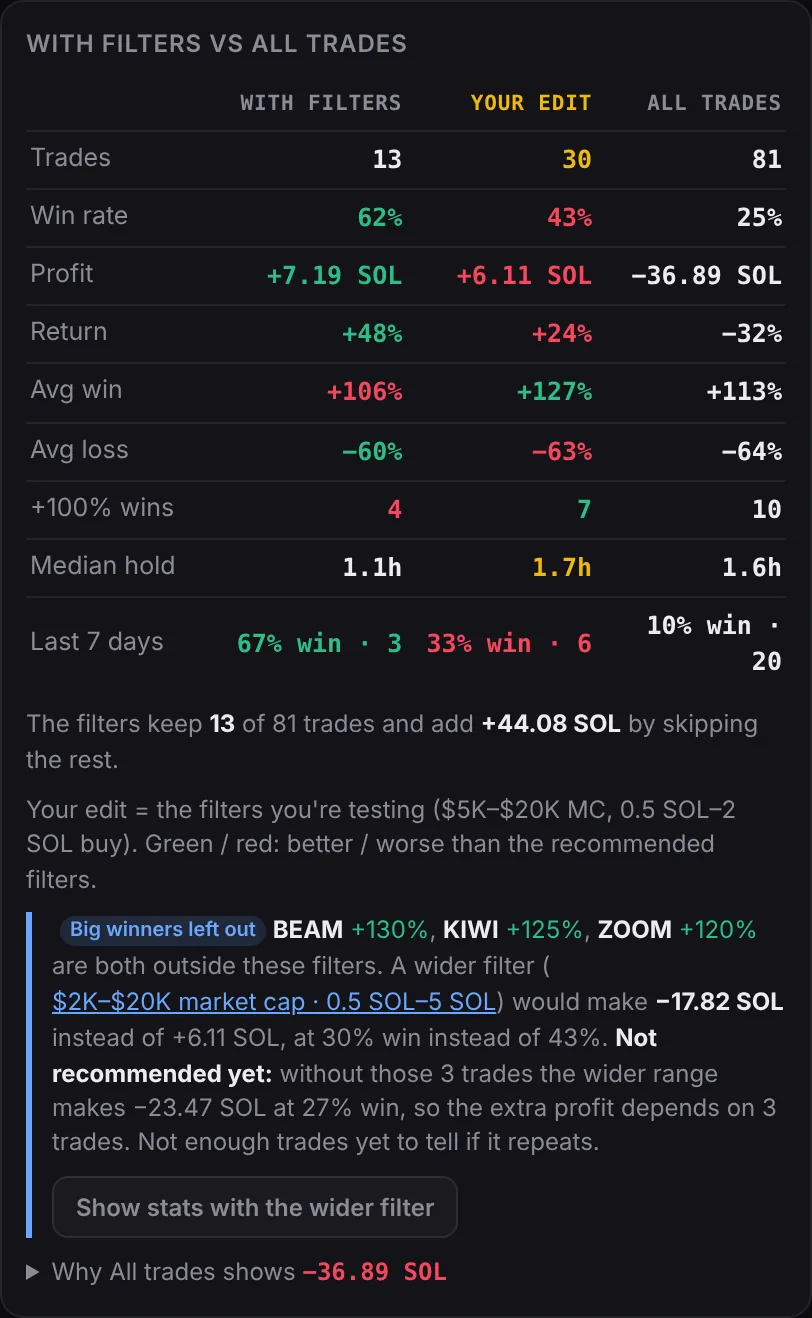
- With filters vs all trades: trades, win rate, profit, return, average win and loss, +100% wins, median hold and the last 7 days, side by side.
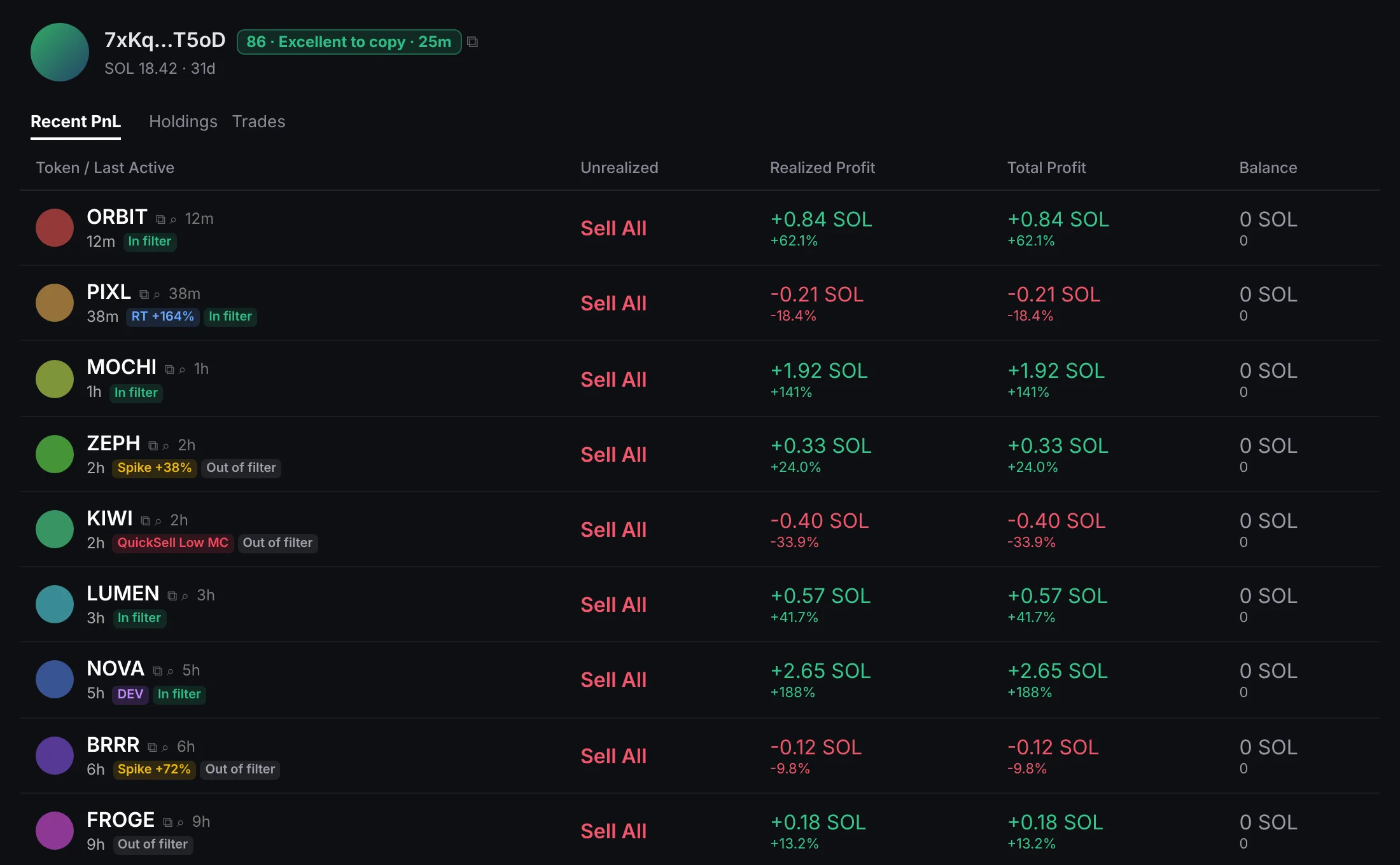
- The token list, with labels for DEV, spikes, round-trips, QuickSell Low MC and repeat buys.
- A period switch (7, 14, 30 days or all 31) to see how the wallet does over shorter windows.
Saved wallets reopen for free from History. Opening one that's more than 30 minutes old fetches only the trades made since.
The reasons sit in two boxes side by side: Raises the score in green and Lowers the score in red.
Wallet lists
Paste many wallets at once, one per line or separated by commas, and press Score. Each one is analyzed in turn; the list shows its score as it finishes, then sorts by score. Click an address to open it on GMGN, or the rest of the row to reopen its analysis. While one wallet is analyzed, the next is pulled in the background.
Recommended filters
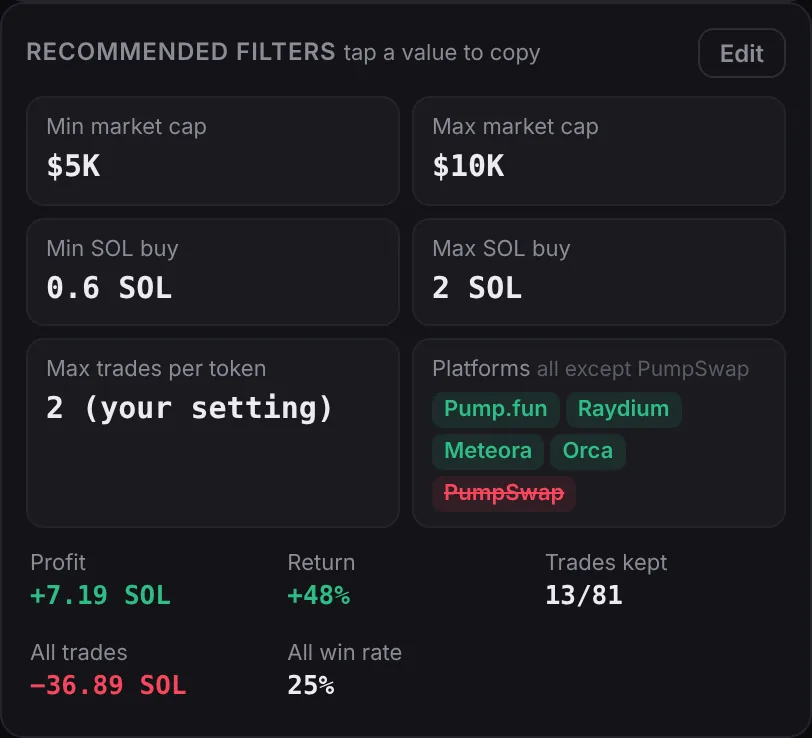
The extension tries every market-cap and buy-size range the wallet traded in and keeps the one that makes the most SOL while winning often, then cuts weak edges and blocks QuickSell trades with a higher minimum market cap. Tap a value to copy it. The buy size and market cap tables show where wins and losses come from, and the cut-off checker shows how the wallet does below any market cap you type.
Test your own filters
Tap Edit in Recommended filters to try your own market cap, buy size and token age. A Your edit column appears in With filters vs all trades, between the recommended filters and all trades: green where yours does better, red where it does worse. The score, token list and GMGN labels follow your edit until you tap Back to recommended filters.
Big winners left out
When 2 or more trades of +100% fall outside the recommended filters, a note under With filters vs all trades names them and shows the wider filter that would catch them. Tap Show stats with the wider filter to add a Wider column to the table: trades, win rate, profit, return, wins and losses with that filter. It also tells you whether the wider range holds up without those trades or depends on a few lucky wins. It's a preview: the score and filters stay the same.
Token age
The extension knows how old each token was when the wallet bought it. A Token age at buy table (under 1h up to 90+ days) sits next to Buy size and Entry market cap, and each token shows its age. When it clearly does better, the recommended filters add a Min / Max token age, cut at whole days around the wallet's own trades (for example 31 days when it wins on month-old tokens and loses on old ones). Turn it off in Settings → Analysis.
Platforms
See where the wallet bought: Pump.fun, PumpSwap, Meteora, Bonk.fun, Raydium and more, each with trades, win rate and net SOL. Tap a platform to leave it out, and the extension suggests which one to turn off when it's dragging the results down.
Recommended filters include a Platforms card: every platform it bought on, except one that loses money inside the filters (shown crossed out in red). Tap it to copy the list.
Spikes & round-trips
An optional check, about 20 Helius credits per token, that looks at the price right around each trade:
- Entry spike: how far the price jumped within a block of the wallet's buy. A copier buying a block later pays that much more.
- Round-trip: a trade that went up 50% or more and still closed red. A take-profit would have caught it.
Run it on all analyzed tokens or only those inside the filters (they're the ones that count in the score). It can run automatically on every wallet you analyze, and a progress bar shows how far along it is.
Top traders
Paste a token address or GMGN link, or several separated by commas, and press Find. The extension reads up to 50,000 of the token's trades and ranks every trader by realized profit.
- Show the top 25, 50, 75 or 100, filtered by Min PnL (in % or SOL) and Max buys.
- Score all of them, or have new searches scored automatically. Round-trip checks can run only on wallets above a score you choose.
- Multi-wallet flags mark wallets trading in the same block as others. In a multi-token search, "3 of 4 tokens" shows repeat winners.
- Auto-check: when you open a token on GMGN, it's searched right away.
Holders
Switch Top traders to Holders and check a token's top 25, 50 or 100 holders. Each is labelled: Dev, Bundler, Sniper, Insider, Fresh wallet, Same funder, Phishing, Multi-wallet or Suspicious. A summary shows how much the top 10, the dev, bundlers and snipers hold, plus mint and freeze authority, with a short "watch out" list.
Automatic
Finds recently migrated tokens that pass your filters (market cap, 24h volume, age, fees, holders and dev share), reads each token's top traders and scores the best of them. It runs one token at a time, can repeat on a timer while the panel is open, and keeps a log with the credits used.
History
Every wallet and Holders check you've run, with views for All, Top traders and Holders. Search, sort by newest or score, copy all 90+ wallets, and reopen anything for free.
Saved & folders
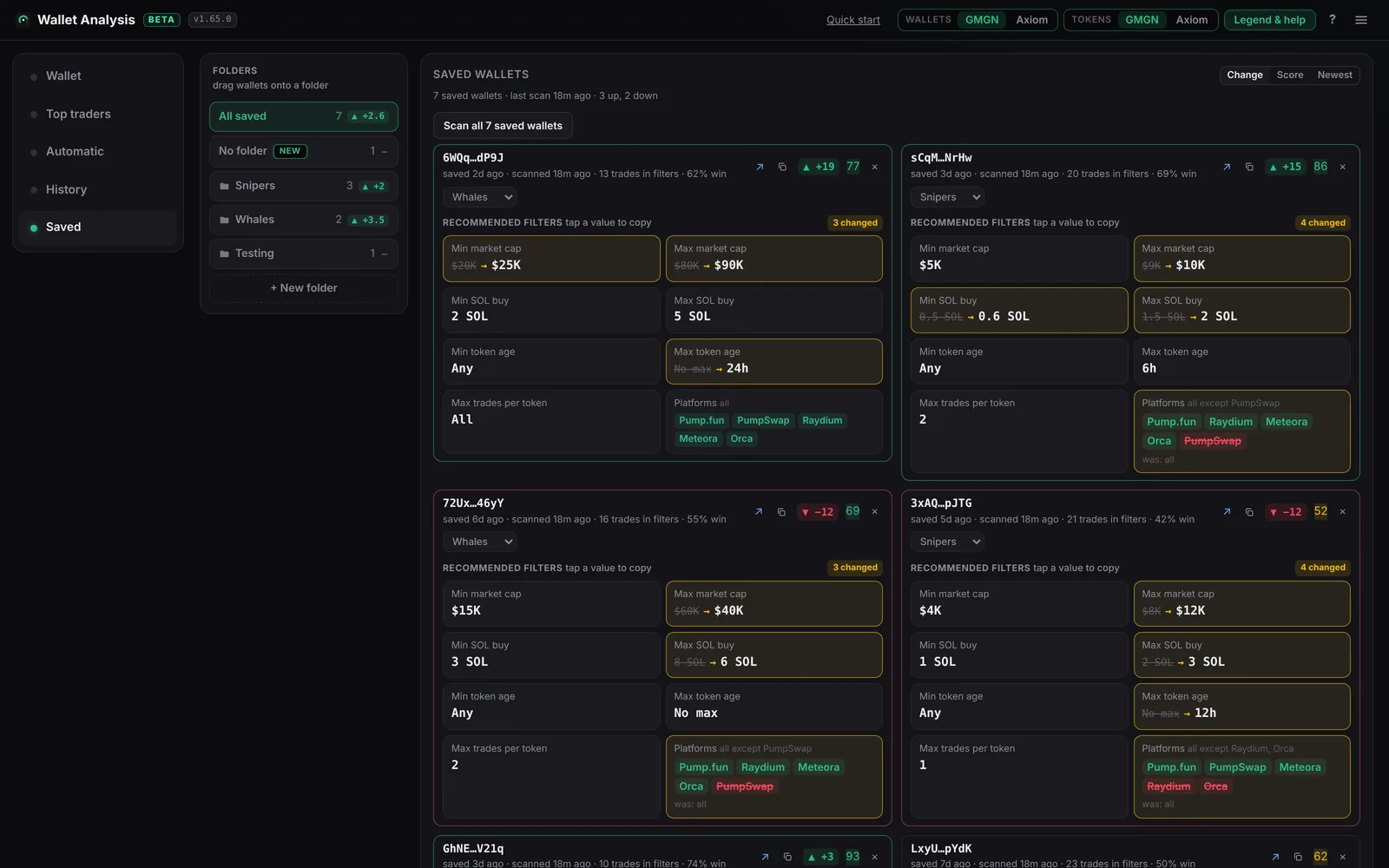
Tap the ✓ next to a score to save a wallet. Scan all fetches each saved wallet's new trades and analyzes it again, then shows how its score moved (green up, red down) and every recommended filter, with changed ones as old value → new value.
- Folders: make folders, drag wallets onto them, and scan one folder at a time. Each folder shows the average score change of its wallets.
- New: wallets you just saved land in No folder with a New tag until you sort them.
- Sync: in the same browser, Saved wallets and folders stay the same in the extension and on the web dashboard. Tap Sync with Web Dashboard once in the extension's Saved tab.
Links & copy buttons
Choose whether wallet links and token links open on GMGN or Axiom, separately (Settings → Links, or the switches next to Legend & help on the web dashboard). Axiom has no wallet pages, so with Axiom a wallet link copies the address and opens Axiom's Wallet Tracker. A copy button next to every wallet and token copies just the address or contract address.
Labels on GMGN
On a gmgn.ai wallet page, a badge next to the address shows the score, grade and how old it is (faded after a day). Each analyzed token gets labels: DEV, Spike, RT, QuickSell Low MC, and In filter or Out of filter. Clicking the badge re-analyzes the wallet. Nothing is added inside GMGN's token side panel, nothing on the page is clicked or changed, and you can turn it off in settings.
Settings & storage
- Helius API keys: add several; when one runs out of credits, the next is used. Each shows its usage.
- Analysis: tokens to analyze, minimum trades per filter, fill gap, never-sold tokens, DEV tokens, platforms, GMGN labels.
- Storage: a meter of what's saved, with a Clear button per kind of data and automatic clean-up when storage is almost full.
- Scoring: Automatic (the defaults above) or Custom, where every rule and number is yours.